Introduction: Why Most Ecommerce Websites Rank Poorly
Your ecommerce website sells quality products. Your prices are competitive. Your customer service is excellent.
But you are not getting traffic from Google.
Meanwhile, competitors with similar products rank on page one. They get consistent customer flow from search. You get almost nothing.
This is not a product problem. This is an ecommerce SEO problem.
Ecommerce SEO is completely different from regular website SEO. You are not ranking for informational content. You are competing for buyer intent keywords. You need to rank for product keywords, comparison keywords, and transactional keywords.
Most ecommerce websites fail at SEO because they treat it like a regular business website. They create generic product descriptions. They do not optimize site speed. They ignore technical SEO. They do not build the backlinks that signal authority to Google.
The result is consistent: No organic traffic. No sales from search.
This guide shows you exactly how to fix your ecommerce SEO. These are proven tactics that work. Implement them, and your organic sales will increase.
Part 1: Understanding Ecommerce SEO vs. Regular SEO
Ecommerce SEO has different priorities than standard website SEO.
Regular website SEO focuses on:
Building topical authority through educational content
Getting people to understand your business
Establishing you as an expert in your field
Converting through information and trust building
Ecommerce SEO focuses on:
Getting people to buy products right now
Ranking for commercial keywords (best product, cheapest option, etc.)
Competing directly with other ecommerce sites selling similar products
Converting through product pages that close sales
The difference matters. Your SEO strategy must match your business goal. If you are trying to sell products, you need ecommerce SEO tactics. Regular SEO tactics will not get you there.
Part 2: Technical Ecommerce SEO (The Foundation)
Technical SEO is what Google sees when it crawls your site. If your technical foundation is weak, Google cannot index your products properly. Your site will not rank.
Most ecommerce sites have technical problems they do not know about.
Site Speed (Critical for Ecommerce)
Your ecommerce site has high-resolution product images. It has many product variations. It has customer reviews loading dynamically. All of this slows your site down.
A slow ecommerce site loses customers. Studies show that every one-second delay in page load costs you about seven percent of customers. A five-second site compared to a two-second site loses about 20 percent of potential sales.
Google notices this too. Slow sites rank lower.
How to improve speed:
Compress all images before uploading (tools like TinyPNG work)
Use a content delivery network (CDN) to serve images from locations close to your customers
Enable browser caching so pages load faster on repeat visits
Remove unnecessary plugins and code
Use a fast hosting provider (not the cheapest option)
Minimize CSS and JavaScript
Lazy load images (only load images when people scroll to them)
Test your speed at Google PageSpeed Insights. It shows exactly what is slowing you down.
Mobile Optimization
More people shop on phones than computers. If your ecommerce site does not work well on mobile, you lose most of your potential customers.
Google uses mobile-first indexing. This means Google primarily crawls and ranks based on your mobile version. If your mobile site is bad, your rankings suffer.
Ecommerce mobile problems:
Tiny text that requires zooming to read
Images that do not load properly on mobile
Forms that do not work on mobile keyboards
Slow mobile load times
Navigation that is hard to use on a phone
Fix these by testing your site on actual mobile phones. Do not just resize your browser. Grab a phone and try to buy something from your store.
Site Structure and Navigation
Google needs to understand your site structure. Products buried deep in navigation are harder to rank. Products accessible from your homepage in a few clicks are easier to rank.
Ecommerce site structure should look like:
Homepage → Category Pages → Subcategory Pages → Product Pages
This hierarchy tells Google what is important. Your main categories are more important than individual products. Your homepage is most important.
Additionally, create an XML sitemap listing all your products. Submit it to Google Search Console. This tells Google about every product you have.
URL Structure
Your product URLs should be clear and descriptive.
Bad URLs:
mysite.com/product?id=12345
mysite.com/p/abc-123
Good URLs:
mysite.com/products/womens-running-shoes
mysite.com/shoes/athletic/womens-running
The good URLs tell both Google and customers what the page is about. Google can read the URL and understand what product it is.
Rules for ecommerce URLs:
Keep them short
Include the product category
Include the product type or brand
Use hyphens between words (not underscores)
Use lowercase letters
Avoid special characters and numbers
Schema Markup for Ecommerce
Schema markup tells Google detailed information about your products. The price. The rating. If it is in stock. The availability.
Products with schema markup appear with more information in search results. This increases click-through rates. More clicks means better rankings.
Implement these schema types:
Product schema (name, price, rating, availability)
Review schema (customer reviews and ratings)
Aggregate rating schema (overall product rating)
Offer schema (price, shipping, return policy)
Most ecommerce platforms (Shopify, WooCommerce, BigCommerce) have built-in schema markup. Verify it is working using Google’s Rich Results Test.
Part 3: Product Page Optimization
Your product pages are where conversions happen. They also have the most ranking potential.
Each product page should be optimized for the keywords people search for when looking for that product.
Product Titles and Descriptions
Your product title is critical. It should include the keyword people search for. It should also be compelling to make people click.
Bad product title: Blue T-Shirt
Good product title: Premium Blue Cotton T-Shirt for Men – Breathable Casual Wear
The good title includes keywords (blue, cotton, mens, t-shirt, casual) and describes why someone should buy it (premium, breathable).
Your product description should tell customers about the product while naturally including relevant keywords.
Avoid keyword stuffing. Write for humans first. Naturally use keywords where they fit.
Include these in product descriptions:
Product materials and construction
Size and fit information
Features and benefits
Use cases (who should buy this, when to wear it)
Shipping and return information
Warranty or guarantee information
Compare to similar products if relevant
Product Images and Alt Text
Product images are critical for ecommerce. Customers need multiple images showing the product from different angles. They need to see it in use. They need to see size and scale.
But images also have SEO value. Google cannot understand images just by looking at them. You need to tell Google what the image shows using alt text.
Good alt text examples:
“Blue cotton mens t-shirt front view”
“Medium sized blue t-shirt laid flat showing fit”
“Man wearing blue cotton t-shirt in casual setting”
Alt text should describe what the image shows. It should naturally include relevant keywords. But it should be a readable description, not keyword stuffing.
Customer Reviews and Ratings
Customer reviews serve two purposes. They help convert customers (people read reviews before buying). They also help with rankings (Google considers reviews as a ranking signal).
More reviews with higher ratings rank better. Fresh reviews rank better than old ones. Detailed reviews rank better than one-word reviews.
To get more reviews:
Ask customers to review after they buy
Make the review process easy (link in order confirmation email)
Respond to reviews (positive and negative)
Feature great reviews prominently
Encourage detailed reviews (ask specific questions like “How is the fit?” or “Is it durable?”)
Part 4: Ecommerce Keyword Strategy
Ecommerce keywords are different from regular keywords. You need to target keywords where people are ready to buy.
Types of Ecommerce Keywords
Product keywords: “blue running shoes” or “organic cotton t-shirt”
Brand keywords: “[Your brand name] running shoes” or “[Your brand name] reviews”
Competitor keywords: “Nike running shoes” or “Adidas shoe alternatives”
Long-tail keywords: “best blue running shoes for wide feet” or “breathable organic cotton t-shirt mens”
Price comparison keywords: “cheapest running shoes” or “affordable organic cotton shirts”
Problem-solution keywords: “running shoes for flat feet” or “t-shirt that does not shrink”
Modifier keywords: “sale,” “deals,” “best,” “2026”
Your best keywords are those where people are actively looking to buy. These have higher intent. They convert better. They are easier to rank for than high-volume generic keywords.
Keyword Research for Ecommerce
Start with your products. What keywords do customers use to describe them?
Ask yourself:
What problem does my product solve?
What specific characteristics does my product have?
What are people searching for when they need this product?
Use tools like Google Keyword Planner or Ubersuggest to find these keywords.
Look for keywords that have:
Monthly search volume of 100-1,000 (sweet spot for ecommerce)
Keyword difficulty below 30 (achievable for newer sites)
Clear commercial or transactional intent
Direct relevance to your products
Keyword Assignment to Products
Do not target the same keyword on multiple product pages. This creates internal competition.
Instead, assign each keyword to one specific product page.
Example:
Product 1 (size small): Target “small blue running shoes” and “narrow blue running shoes”
Product 2 (size large): Target “large blue running shoes” and “wide blue running shoes”
Product 3 (men’s style): Target “mens blue running shoes”
Product 4 (women’s style): Target “womens blue running shoes”
This way, each product targets unique keywords. No internal competition. Each page has a clear ranking opportunity.
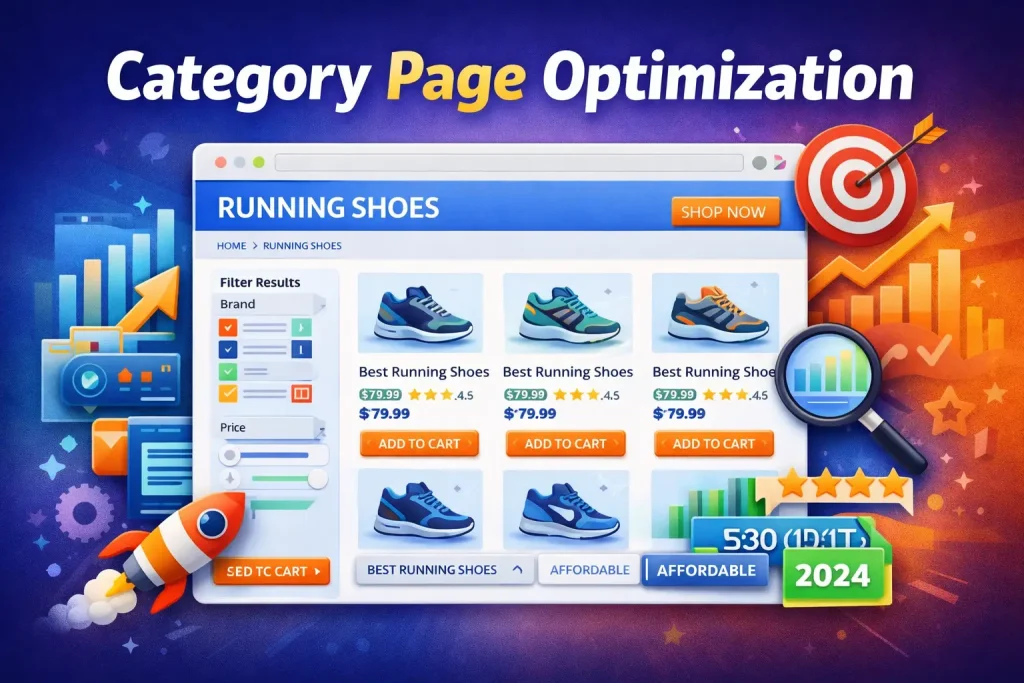
Part 5: Category Page Optimization
Category pages are forgotten. Most ecommerce sites optimize products but ignore categories.
Category pages rank for broader keywords. They rank for higher volume searches. Optimizing them brings significant traffic.
A category page for “running shoes” should:
Have a clear, descriptive title tag
Have a unique meta description
Include introductory content explaining the category
Show all products in that category with images and prices
Include filters (brand, size, price, etc.)
Have customer reviews aggregated across all products
Include internal links to popular products
Optimize for broader keywords like “best running shoes” or “affordable running shoes”
Many ecommerce sites treat categories as just product listings. This misses massive ranking opportunity. Treat category pages like full web pages. Optimize them like any other page.
Part 6: Building Backlinks for Ecommerce
This is where most ecommerce sites fail.
Backlinks are votes for your site. The more quality backlinks you have, the more authority Google gives you. Sites with more authority rank higher.
But most ecommerce sites do nothing to earn backlinks. They assume backlinks will come naturally. They do not.
Your competitors who rank probably have backlinks. You do not. This is one reason they outrank you.
How to build ecommerce backlinks:
Reach out to bloggers and journalists in your industry. Get mentioned in their content.
Create a product or resource worth linking to (unique product, detailed guide, original research)
Write guest posts on industry blogs with links back to your site
Get listed in industry directories and resource lists
Sponsor or partner with related websites
Get press mentions about your company, products, or team
Host events (webinars, product launches) that get mentioned and linked
The key is providing value. Do something noteworthy. Other sites will link to you naturally.
Part 7: Content Marketing for Ecommerce
Most ecommerce sites think content is only for blogging. Wrong.
Content marketing helps ecommerce in multiple ways:
Brings traffic to your site (people search for answers before buying)
Builds trust (people see you as expert before they shop)
Builds authority (Google sees your site as trustworthy)
Supports your products (explains problems your products solve)
Gets backlinks (useful content gets linked)
Content for ecommerce includes:
Blog posts answering common questions
Buying guides (how to choose the right product)
Problem-solution articles (problems your products solve)
Comparison guides (your products vs. competitors)
Trend articles (what is popular, new, relevant)
How-to guides (how to use your products)
For example, a running shoe ecommerce site could publish:
“How to Choose the Right Running Shoes for Your Foot Type”
“Best Running Shoes for Marathon Training”
“Common Running Injuries and What Shoes Help”
“How to Make Your Running Shoes Last Longer”
Each article targets keywords people search for. Each article brings traffic. Each article can link to your products naturally.
Part 8: User Experience and Conversion Rate Optimization
Google ranks sites where users stay longer and convert more. User experience is a ranking signal.
Improve your user experience by:
Clear navigation (people find what they want quickly)
Fast load times (not waiting for pages to load)
Easy search functionality (especially for large catalogs)
Clear calls to action (easy to see “add to cart” button)
Customer reviews visible (builds trust)
Free shipping information visible (reduces checkout barriers)
Return policy visible (reduces purchase anxiety)
Mobile-friendly design (works perfectly on phones)
Minimal form fields (fewer fields = higher conversion)
Guest checkout option (do not force account creation)
Multiple payment options (PayPal, credit cards, Apple Pay, etc.)
Test these improvements. Track conversion rate changes. Small improvements add up to big sales increases.
Part 9: Building Authority in Your Ecommerce Niche
Google wants to rank sites that are authorities. How do you become an authority in your ecommerce niche?
Create original content that only you can create
Share your unique perspective or expertise
Accumulate reviews and ratings over time
Build a presence through social media and community
Get press mentions and interviews
Build a loyal customer base that shares your products
Participate in industry events and associations
Create tools or resources specific to your niche
Develop a recognizable brand
Authority is built over time. It does not happen overnight. But sites with high authority rank better and convert better.
Part 10: Monitoring and Optimization
You launched your ecommerce SEO strategy. Now what?
Do not forget about it. Most sites implement SEO once, then ignore it. They wonder why results plateau.
SEO needs ongoing attention:
Monthly keyword ranking tracking
Monthly traffic monitoring
Monthly conversion rate tracking
Quarterly page audits (is outdated content still ranking?)
Quarterly competitor analysis
Regular content updates (products change, prices change, inventory changes)
Regular backlink building
Use Google Analytics to understand:
Which pages get most traffic
Which products get most traffic
Which keywords drive conversions
Bounce rate by page (high bounce means problem)
Conversion rate by traffic source
Use Google Search Console to understand:
Which keywords drive impressions
Which keywords drive clicks
Which pages appear in search results
Whether Google has crawl or indexing errors
Track this data monthly. Identify what is working. Double down on what works. Fix what is not working.
Part 11: Ecommerce SEO Timeline and Expectations
When will you see results?
Month 1-2: Implementation. You optimize products. You build basic backlinks. No ranking changes yet.
Month 3-4: First improvements. Some product pages rank on page 2-3. Light organic traffic arrives (10-50 visitors monthly).
Month 5-8: Significant improvement. More pages rank on page 1. Organic traffic increases (50-200+ visitors monthly). Early sales from organic traffic.
Month 9-12: Major results. Consistent page 1 rankings. Steady organic traffic (200-500+ visitors monthly). Real sales from organic traffic.
Month 12+: Compounding. Authority increases. Rankings improve. Traffic and sales grow consistently.
The timeline varies by competition. In a less competitive niche, you might see results faster. In a highly competitive niche, it takes longer.
The key is consistency. Most ecommerce sites give up at month 4 when results have not come yet. Persistence wins.
Frequently Asked Questions About Ecommerce SEO
Q: How long does ecommerce SEO take to show sales impact?
A: Most businesses see measurable sales from ecommerce SEO between months 5-12. Month 1-4 builds foundation. Month 5+ produces results. Highly competitive niches may take longer.
Q: Should I do ecommerce SEO myself or hire an agency?
A: DIY works if you have time (10-15 hours weekly) and willingness to learn technical SEO. Hiring an ecommerce SEO specialist accelerates results. Elite SEO Rankers’ SEO services focus on ranking products and driving sales, not just traffic.
Q: How many products should I optimize?
A: Start with your best sellers. Optimize the products that generate the most revenue. This focuses effort on products that convert. After success, expand to other products.
Q: Should ecommerce sites write blog content?
A: Yes. Blog content ranks for educational keywords. It brings traffic. It builds authority. It supports your products (blogs can link to relevant product pages). Plan for one blog post every two weeks.
Q: How important is site speed for ecommerce?
A: Critical. Ecommerce conversion rates drop significantly with slow load times. Google also ranks faster sites higher. Invest in speed optimization early.
Q: How do I get customer reviews?
A: Email customers after purchase. Include direct link to review. Make the review process simple. Offer incentive if allowed by platform (gift card, future discount). Respond to all reviews.
Q: Can I rank without backlinks?
A: New ecommerce sites struggle to rank without backlinks. Established sites with strong authority might rank with good content. But backlinks accelerate ranking significantly.
Q: How often should I update product pages?
A: Update product pages when price changes. Update when new reviews arrive. Update when inventory changes. Update when product features change. Avoid unnecessary changes.
Q: Should I target competitor brand names?
A: Yes. Target “[Competitor Brand] alternatives” or “[Competitor Brand] vs [Your Brand].” These keywords capture people looking to switch. But do not target competitor brand names directly (trademark risk).
Q: How do I handle out-of-stock products?
A: Keep the product page live. Mark it as out of stock. Include “notify me when available” option. Remove product only if it will never be restocked. Out-of-stock pages still rank and can drive future sales.
Conclusion: Your Ecommerce SEO Action Plan
You now understand ecommerce SEO. More importantly, you know exactly what to fix on your site.
Start with one thing. Pick what will have biggest impact:
If site is slow: Fix speed first.
If product pages are poorly optimized: Optimize top 20 products.
If site has no backlinks: Start building them.
If no customer reviews: Implement review request process.
Do one thing well rather than many things poorly. Build from there.
In 12 months of consistent effort, your organic sales will increase significantly. By month 18, SEO becomes a major traffic source.
Ready to accelerate your ecommerce sales? Contact Elite SEO Rankers for ecommerce SEO strategy consultation. We help ecommerce businesses rank their products and increase sales from search.
Start this week. Every week you wait is a week your competitors gain advantage.